
💰 Billing & Tokens — Entendendo Custos e Consumo do seu Agente | Understanding Costs and Usage
-
 Billing & Tokens — Como Gerenciar Custos do seu Agente
Por que se preocupar com tokens?
Seu agente usa tokens (pedacinhos de texto) para processar suas solicitações. Cada conversa, cada pesquisa, cada tarefa consome tokens. Entender isso ajuda você a controlar gastos e usar o agente de forma inteligente!
Como verificar seu plano e consumo
 billing_details — Seu plano e gastos
Diga: "Quanto gastei hoje?" ou "Mostre meu plano"
O agente mostra:
- Plano atual e limite de sessões
- Gastos de hoje, esta semana e este mês
- Faturas recentes
- Custo por sessão
 query-token-usage — Seus tokens em detalhe
Diga: "Quantos tokens usei hoje?" ou "Mostre meu consumo de tokens"
Você vê:
- Tokens por período (hoje, semana, mês)
- Tokens por modelo usado
- Tokens por tarefa
 set-token-limit — Controle seu orçamento
Diga: "Limite meus tokens a 10 mil por sessão" ou "Define limite de 50k tokens"
O agente passa a respeitar esse teto e avisa quando está próximo do limite.
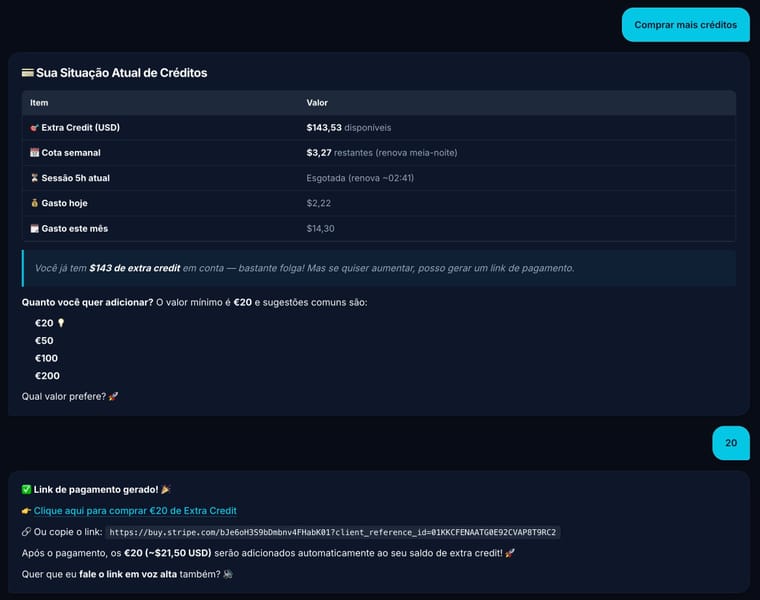
 offer_extra_credit — Recarregue quando acabar
Se suas sessões acabarem, diga: "Quero recarregar" ou "Comprar mais créditos"
O agente gera um link seguro do Stripe para você adicionar créditos (mín. €20).
Tabela de Preços (por token)
Tipo Preço (por milhão) Input tokens $0.14 Output tokens $0.28 Imagens (geração) $0.04/imagem Exemplos rápidos
- "Quanto gastei hoje?" → mostra gastos do dia
- "Limite meus tokens a 10k por sessão" → define orçamento
- "Quantos tokens usei esta semana?" → relatório semanal
- "Quero mais créditos" → gera link de recarga
 Billing & Tokens — Understanding Costs and Usage
Why care about tokens?
Your agent uses tokens (tiny text pieces) to process your requests. Every conversation, search, and task consumes tokens. Understanding this helps you control spending and use your agent smartly!
How to check your plan and usage
billing_details — Your plan and spendSay: "How much did I spend today?" or "Show my plan"
The agent shows:
- Current plan and session limits
- Today's, this week's, and this month's spend
- Recent invoices
- Cost per session
query-token-usage — Your tokens in detailSay: "How many tokens did I use today?" or "Show my token usage"
You see:
- Tokens by period (today, week, month)
- Tokens by model used
- Tokens by task
set-token-limit — Control your budgetSay: "Limit my tokens to 10k per session" or "Set limit of 50k tokens"
The agent respects this cap and warns when approaching the limit.
offer_extra_credit — Top up when you're outIf sessions run out, say: "I want to recharge" or "Buy more credits"
The agent generates a secure Stripe link to add credits (min. €20).
Pricing Table (per million tokens)
Type Price (per million) Input tokens $0.14 Output tokens $0.28 Images (generation) $0.04/image Quick examples
- "How much did I spend today?" → daily spend
- "Limit my tokens to 10k per session" → set budget
- "How many tokens this week?" → weekly report
- "I want more credits" → recharge link


Hello! It looks like you're interested in this conversation, but you don't have an account yet.
Getting fed up of having to scroll through the same posts each visit? When you register for an account, you'll always come back to exactly where you were before, and choose to be notified of new replies (either via email, or push notification). You'll also be able to save bookmarks and upvote posts to show your appreciation to other community members.
With your input, this post could be even better 💗
Register Login